Skip to content

BOTPASS 4.0 · BRAND MCP SERVER

Let AI query your website instead of remembering it.

Botpass turns any website into a brand MCP server. ChatGPT, Claude and other compatible assistants query your real data —services, catalogue, locations, FAQs— and complete actions such as requesting an audit or booking a meeting.

See how to connect

Free · Just your website address · With or without WordPress · Hosted in the EU

mcp.botpass.io/your-brand EXAMPLE
Is the Trail Runner 2 in stock in size 42?
search_offers·get_offer
Yes, it's in stock at €89 (down from €109). Free returns for 30 days. Would you like the store to contact you about this model?
request_contact· asks for confirmation before sending

BOTPASS IN BRIEF

What is Botpass?

Botpass is a service that turns any company's website into a brand MCP server. AI assistants query the brand's official data on it and can complete actions, such as requesting an audit or booking a meeting, without leaving the conversation. It is built by Botpass Labs.

What it is
A service that turns any website into a brand MCP (Model Context Protocol) server.
Who it's for
Any company with a website: B2B services, real estate agencies, car dealerships, online stores and any business with offerings, locations or FAQs.
How your website connects
With just its address: Botpass reads it and prepares your profile. Plus a one-click WordPress plugin (with WooCommerce), catalogue feeds (Google Merchant, Kyero, XML, CSV or JSON), the catalogue API or the brand profile in the dashboard.
How assistants connect
With MCP, by adding the address as a connector in Claude, ChatGPT, Cursor or VS Code. Without MCP, like Gemini, by reading your server’s public page and its action links. WebMCP and NLWeb too. No key needed.
Server address
mcp.botpass.io/your-brand, with no subdomains or DNS changes.
What it publishes
Brand profile, catalogue (properties, vehicles, products or services), locations, promotions, FAQs and case studies, each with its source URL.
Supported actions
Contact requests, audit requests and meeting or viewing bookings, including for a specific catalogue item, always confirmed by the user.
Assistants
ChatGPT, Claude, Gemini, Perplexity and any agent: via MCP, WebMCP, NLWeb or by reading the web.
Hosting
AWS Ireland (European Union).
Price
Free, with open sign-up.
Company
Botpass Labs, an AI search agency (GEO and AEO).

01 — THE PROBLEM

Today, AI talks about your company using what it crawled weeks ago.

Prices that changed, services you no longer offer, offices that moved. And when someone wants to hire you, the assistant sends them to your website and the conversation is lost.

BEFORE

Second-hand data

The assistant summarises what a crawler once read, mixed with what third parties say.

BEFORE

No way to act

The user wants a quote or a meeting, and the assistant can only give them a link.

WITH BOTPASS

Official, live source

The assistant asks your server, gets data you approved with its source URL and can complete the action.

02 — BENEFITS

What your company gets from Botpass.

AI shares your information, accurate and up to date

Assistants query your prices, stock, promotions and opening hours live instead of repeating what they crawled weeks ago. With feeds, the catalogue updates every 15 minutes.

You get cited as the source

Every answer carries your website's URL: the assistant names and links to you, not to a comparison site or a portal.

Conversations turn into leads

Contact, audit, meeting or viewing requests for a specific item, without leaving the chat. They reach you by email or webhook, with GDPR consent.

You decide what is said about your brand

Nothing is published without your approval and you can edit the profile by hand. Far more control than you have over what AI infers by crawling.

Agents find you on their own

Automatic discovery on your website and listing in the official MCP registry: an agent can reach your server without anyone setting it up.

No development or technical changes

No DNS or servers: the WordPress plugin, a feed you already have or the dashboard profile. Hosted in the European Union.

Get there before your competitors

Very few brands have their own MCP server today. As assistants move from answering to acting, having an official, connectable source is an advantage.

Adds to your SEO and GEO

SEO and GEO help AI find and cite you; Botpass gives it an official source to query and a way to convert.

03 — HOW IT WORKS

Type your website. Botpass does the rest.

In about a minute, Botpass reads your home page and sitemap (up to 20 pages), recognises your brand and platform, prepares your profile and publishes your server at mcp.botpass.io/your-brand. No subdomains, no DNS, no development.

  1. 01

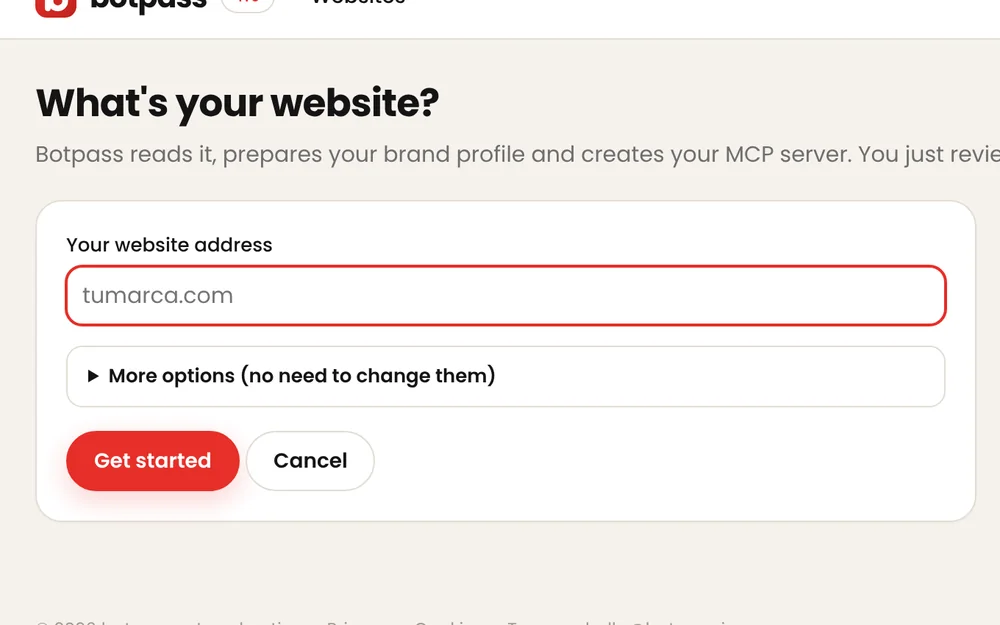
    Type your website address

    That's all we ask. The contact action comes switched on, so assistants can send you customers from day one.

    Botpass dashboard: adding a website with just its address
  2. 02

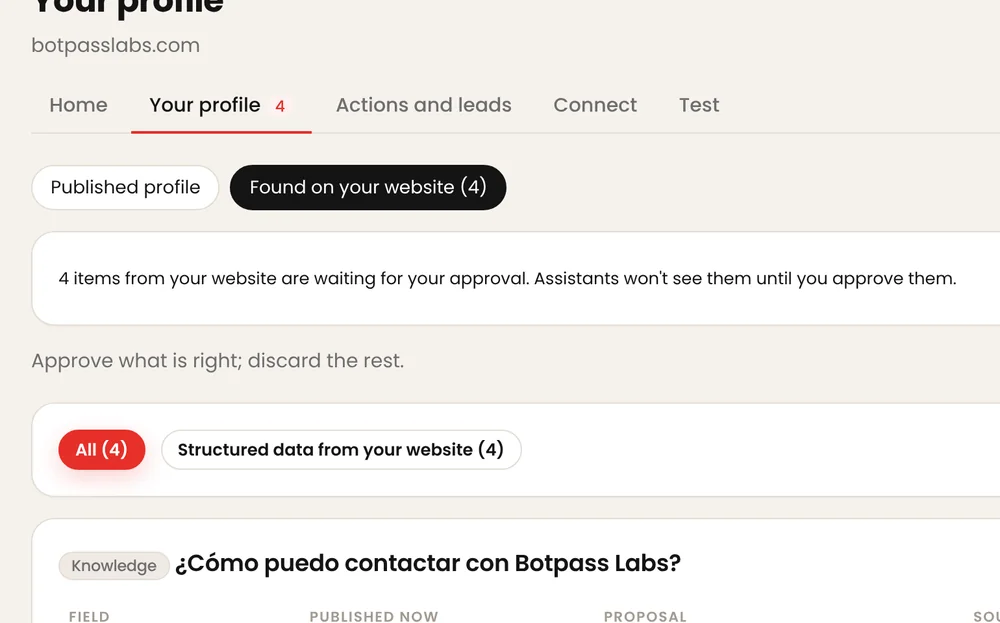
    Approve what it found

    Services, FAQs, locations and contact details, each with its source page. Approve them one by one or all in one click.

    Botpass dashboard: data found on the website, with its source and an Approve all button
  3. 03

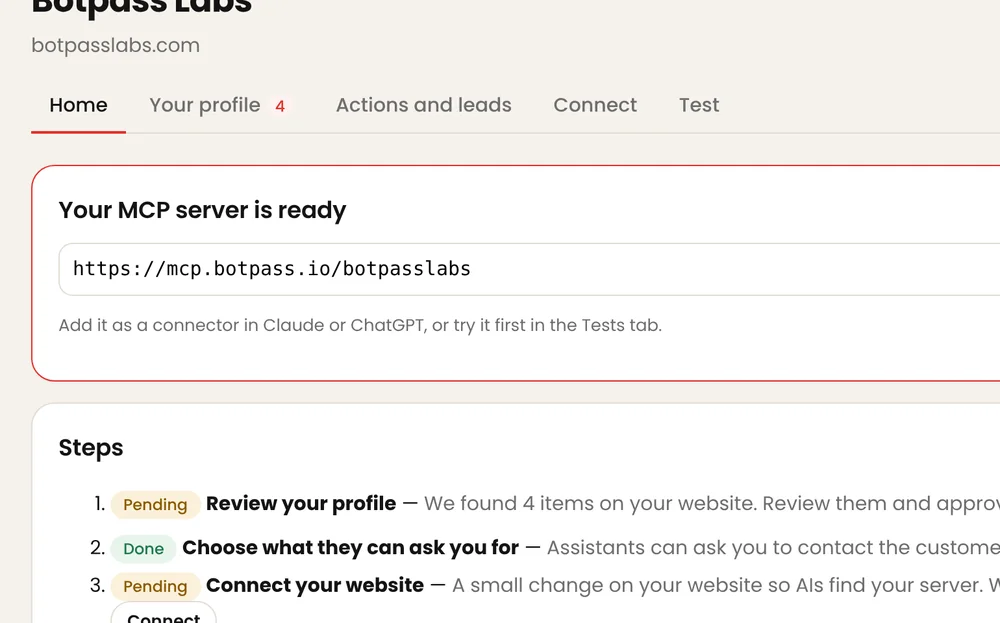
    Your MCP server, ready

    Copy the address and add it in Claude or ChatGPT, or try it first in the dashboard’s test chat.

    Botpass dashboard: MCP server ready and what assistants already know
04

Connect your website so AI finds you on its own

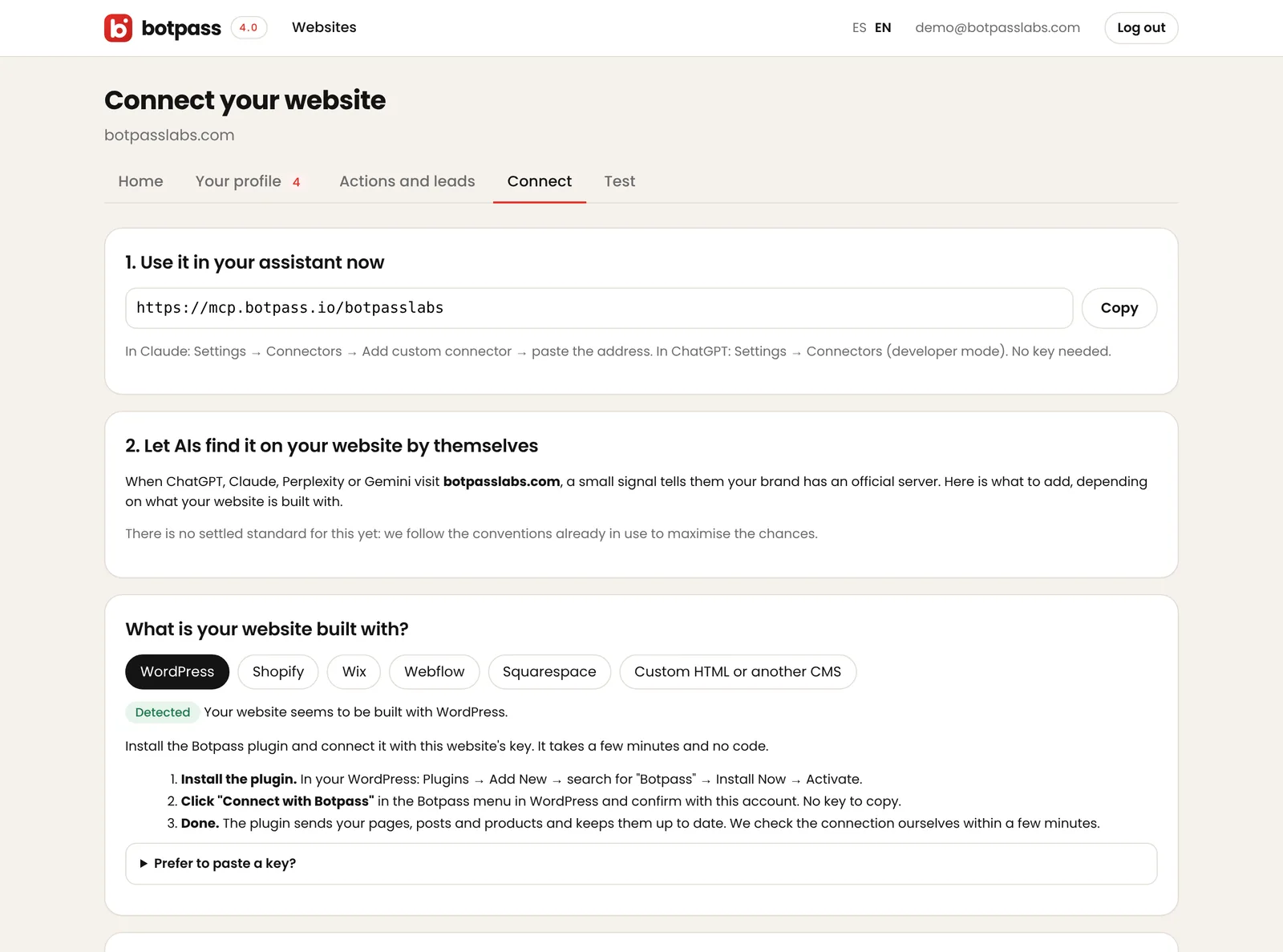
Botpass detects what your website is built with and tells you exactly what to do.

  • WordPress: install the plugin from WordPress.org and click “Connect with Botpass”. No keys to copy.
  • Shopify, Wix, Webflow, Squarespace or custom HTML: the dashboard gives you the steps for your platform.
  • Daily check: Botpass checks every day that your website still announces your server and tells you if anything is missing.

See the plugin on WordPress.org →

Botpass dashboard: Connect tab with the WordPress platform detected
The dashboard’s “Connect” tab, with the platform detected automatically.

04 — ANY ASSISTANT

Found and contacted from any AI, MCP or not.

MCP is the standard, but not every assistant uses it yet. Botpass publishes your brand in every format AI assistants ask in today, and contact requests still reach you.

Assistants with MCP

ChatGPTClaudeCursorVS Code

They connect to your MCP address and use your tools: they search your catalogue, answer with your FAQs and send contact requests.

WebMCP, Google’s standard in Chrome

WebMCPGoogle Chrome

Google is driving it in Chrome, with Microsoft, so agents use a website’s functions instead of guessing at buttons. With the plugin, your website offers your tools there: search the catalogue, check promotions or request contact. It is in trial in Chrome; your website is ready for it.

Conversational search

NLWebSchema.org

mcp.botpass.io/your-brand/ask answers natural-language questions with your published answers, following the open NLWeb protocol.

Assistants that only read the web

GeminiAI browsers

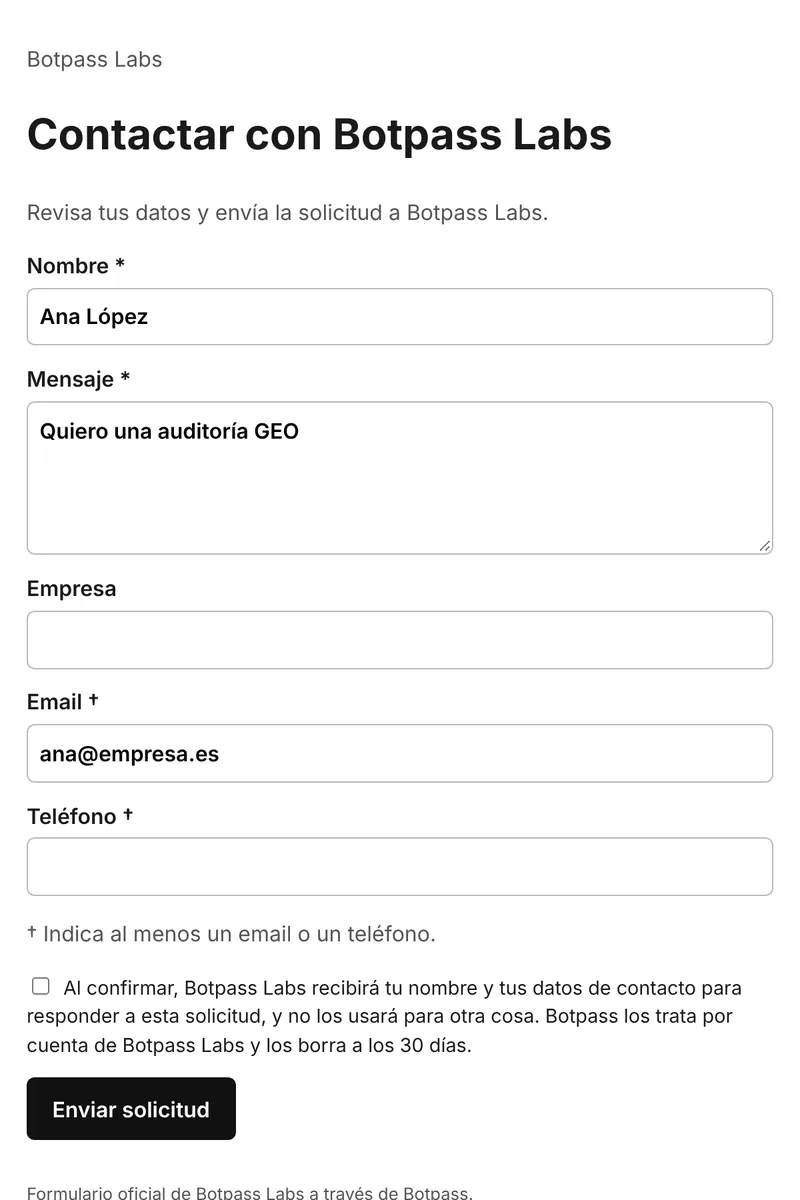
Your address is also a readable page with your profile. Each action has a link the AI fills in for the user: they just review and send.

A brand’s contact form, prefilled by an AI assistant without MCP
Form prefilled by an assistant without MCP (example in Spanish): the user just reviews and sends.

05 — WHO IT'S FOR

Where Botpass shines: websites with a catalogue that changes.

It works with any company website, with or without WordPress. It shines when prices, stock or promotions change often and a question can turn into a sale, a viewing or a meeting.

ONLINE STORES · THE STAR CASE

Your store, inside ChatGPT, Gemini and Chrome’s agents.

When someone asks an AI for “waterproof trail running shoes under €120”, the assistant asks your store and answers with your price, your stock and today’s promotion, with a direct link to your product page.

  • Catalogue with price, stock, SKU, brand and photos, from WooCommerce or your Google Merchant feed (which also works for Shopify), refreshed every 15 minutes.
  • Only the promotions valid today, with their terms and codes: the AI never announces expired offers.
  • Google’s WebMCP: your store is ready for Chrome’s agents to search and filter products with your tools, without clicking around blindly.
  • The enquiry arrives linked to the product the customer saw, by email or to your CRM.
WooCommerceGoogle MerchantShopifyWebMCPChatGPTGemini
mcp.botpass.io/your-storeEXAMPLE
I’m looking for waterproof trail running shoes under €120.
search_offers·get_promotions
The official store has a model that fits, in stock and 15% off until Sunday: Waterproof Trail ShoeIn stock · code TRAIL15€109€129
request_contact· Want the store to contact you about this model?

Real estate agencies

Properties with operation (sale or rent), type, size, bedrooms, bathrooms, area, condition and energy rating, from your feed (Kyero, XML, CSV or JSON). Users request a viewing of a specific property.

Car dealerships

Vehicles with make, model, trim, year, mileage, fuel, transmission, body type and emissions label. The enquiry arrives linked to the car the user saw.

B2B services

Agencies, consultancies, law firms and industry. Dedicated template: services, published case studies, audit requests and meeting booking.

Any company

The core works for everyone: official profile, offerings, locations and opening hours, promotions, FAQs and contact requests. Dedicated templates for SaaS, appointment-based services and local businesses are on the way.

06 — CONNECT

Every way to connect.

There are two connections: your website to Botpass, which feeds the server, and assistants to your server, which use it. Your address is https://mcp.botpass.io/your-brand and needs no key: querying is open and actions always ask the user to confirm.

YOUR WEBSITE → BOTPASS

Connect your website

  • Any website, with just its address

    Botpass reads your home page and sitemap and prepares your profile. So assistants find you on their own, it detects your platform (Shopify, Wix, Webflow, Squarespace or custom HTML), gives you the steps and checks it every day.

  • WordPress plugin

    Install it from WordPress.org (Plugins → Add New → “Botpass”) and click “Connect with Botpass”: it links to your account without copying keys. It syncs pages, posts, content types and forms, sends WooCommerce products to the catalogue (price, stock, SKU and photos) and publishes the discovery files and WebMCP tools on your domain.

  • Catalogue feeds

    Google Merchant, Kyero, XML, CSV or JSON. They sync every 15 minutes and only when something changes; AI suggests how to map the fields and you adjust the mapping in the dashboard.

  • Catalogue API

    To send inventory from your own system, using your website's API key.

  • Brand profile in the dashboard, for any website

    Organisation, offerings, locations, promotions and knowledge (FAQs, case studies, policies and facts), editable by hand.

  • Coming soon

    Templates for SaaS, appointment-based services and local businesses, a Cloudflare rule and apps for Shopify and Webflow. Meanwhile, a Shopify store can already connect through its Google Merchant feed.

ASSISTANTS → YOUR SERVER

Connect assistants

  • Claude

    Settings → Connectors → Add custom connector, then paste your MCP address.

  • ChatGPT

    Turn on developer mode, go to Connectors and paste your MCP address.

  • Gemini and assistants without MCP

    Give them your address: it is also a readable page with your profile and with action links the assistant fills in for the user.

  • Cursor, VS Code, Claude Code and other MCP clients

    Add a remote server (Streamable HTTP) with your address:
    {"mcpServers": {"your-brand": {"url": "https://mcp.botpass.io/your-brand"}}}

  • In-browser agents and conversational search

    WebMCP, the standard Google is trialling in Chrome, on your own website (with the plugin) and the NLWeb endpoint mcp.botpass.io/your-brand/ask, with Schema.org answers.

  • Agents that find you on their own

    They discover your server through the files the plugin publishes on your website (/.well-known/mcp, llms.txt, <link rel>, the Link header and robots.txt), through its public card at mcp.botpass.io/your-brand/server-card.json and through the official MCP registry, where it is published daily when something changes.

  • Dashboard playground

    Before connecting it anywhere, try it in a chat exactly as an assistant will see it.

07 — TOOLS

What an assistant can ask your brand.

Every answer comes from your published content and carries its source URL, so the assistant cites your website rather than third parties.

CORE · ALL WEBSITES

get_brand_profile

Official profile: description, contact details, website, social profiles, main location and available actions.

search_offers

Searches the catalogue by keywords, category or price, with filters for each sector: operation, size and bedrooms for properties; make, year, mileage or fuel for vehicles.

get_offer

Full details of an item or offering: description, price, availability, attributes, photos, URL and promotions.

list_locations

Offices, stores or service points with address, phone and opening hours.

answer_question

Answers with your own FAQs, policies, case studies and facts, each with its URL.

get_promotions

Only promotions valid today, with conditions, dates and codes.

request_contact

The user leaves their details for you to get in touch, also about a specific catalogue item.

TEMPLATE · B2B SERVICES

Tools designed for your type of business.

The first template is for B2B service companies. SaaS, online stores, appointment-based services and local businesses come next.

get_services

Service catalogue with scope and price.

get_case_studies

Published case studies, with what was done and the results.

request_audit

The user requests an audit of their website.

book_meeting

Books a meeting with your team, also about a specific service.

08 — ACTIONS

From interest to lead, without leaving the conversation.

Request an audit, book a meeting or a viewing, or leave contact details about a specific item. The assistant always shows a summary and the privacy notice, and only sends once the user confirms. It also works with assistants that don’t use MCP, such as the Gemini app: they fill in a link and the user just reviews and sends.

  1. 01

    The user asks

    “I'd like an audit.” The assistant collects the details it needs.

  2. 02

    They confirm a summary

    They see exactly what is sent, to whom and for what purpose, in line with the GDPR.

  3. 03

    You get the lead

    By email or by webhook to your CRM, with the item the user saw, if any, and where the conversation came from.

09 — CONTROL

You decide what your brand says.

Nothing is published without approval

Whatever Botpass reads from your website lands in your dashboard as pending, with its source page. Review it one by one or approve it all in one click, and correct anything by hand.

Hosted in the European Union

Servers in AWS Ireland. Leads are handled with a privacy notice and explicit confirmation.

Extraction with three models

Claude, GPT and Gemini work behind a common layer, with a primary and a fallback model for each task.

DISCOVERY

Agents know where to ask.

The plugin publishes the standard files that announce your server, plus its WebMCP tools, on your domain; your server has a public card and an NLWeb endpoint and is listed in the official MCP registry. Botpass checks every day that your website still announces it.

  • /.well-known/mcp/catalog.json
  • server-card.json
  • Link
  • ai-catalog.json
  • llms.txt
  • <link rel>
  • robots.txt
  • Official MCP registry
  • WebMCP
  • NLWeb /ask

10 — GET STARTED

Your MCP server in a minute, free.

Sign-up is open and free. If paid plans arrive, we will give you advance notice before charging anything.
  1. 01

    Type your website

    Create your account with your email or Google, free and with no card. Botpass reads your website and prepares the profile.

  2. 02

    Approve what it found

    One by one or all in one click. You can edit any detail by hand.

  3. 03

    Connect your website

    The WordPress plugin in one click or the steps for your platform, plus a feed if you have a catalogue.

  4. 04

    Share it with assistants

    Your MCP address in Claude, ChatGPT or your MCP client. The rest find you on their own.

11 — FAQ

Frequently asked questions

What is Botpass?

Botpass is a Botpass Labs service that turns any company's website into a brand MCP server at mcp.botpass.io/your-brand. MCP-compatible AI assistants query the brand's official data on it (catalogue, services, locations, promotions and FAQs) and can complete actions such as contact, audit, meeting or viewing requests.

What is an MCP server?

MCP (Model Context Protocol) is the open standard AI assistants use to connect to external data sources and tools. With an MCP server, a compatible assistant can ask your brand directly instead of searching the web.

What are the benefits of using Botpass?

AI shares your information accurately and up to date, cites you as the source, turns conversations into leads without leaving the chat, lets you control what is said about your brand and helps agents find you on their own. No development, and it complements your SEO and GEO.

What types of website is it for?

Any company website, with or without WordPress. It has a dedicated template for B2B services and a sector catalogue for real estate agencies, car dealerships and online stores; other businesses use the core (profile, offerings, locations, promotions and FAQs). Templates for SaaS, appointment-based services and local businesses are on the way.

Is Botpass a WordPress plugin?

No. Botpass is the service that publishes your MCP server and works with any website, with just its address. The WordPress plugin, available on WordPress.org, is an optional way to connect it in one click, sync WooCommerce and publish the discovery files on your domain.

How do I connect my website to Botpass?

Type its address when you sign up: Botpass reads your home page and sitemap (up to 20 pages) and prepares your brand profile, which you approve. So assistants find you on their own, on WordPress install the plugin and click “Connect with Botpass”, with no keys to copy; on Shopify, Wix, Webflow, Squarespace or custom HTML, the dashboard gives you the exact steps and checks it every day. If you have inventory, add a feed (Google Merchant, Kyero, XML, CSV or JSON) or use the catalogue API.

How often is the catalogue updated?

Feeds sync every 15 minutes and only when something changes; you can also force a sync from the dashboard. Withdrawn or sold items stop being shown and can no longer be requested.

How do I connect my server to Claude, ChatGPT or other assistants?

Copy your MCP address from the dashboard. In Claude: Settings → Connectors → Add custom connector. In ChatGPT: developer mode → Connectors. In Cursor, VS Code, Claude Code and other MCP clients, add it as a remote server (Streamable HTTP). Agents can also discover it on their own through the discovery files, the server's public card and the official MCP registry.

Does it work with Gemini and assistants that don’t use MCP?

Yes. Your address mcp.botpass.io/your-brand is also a readable page with your brand profile that any assistant can read. And each active action has a link the assistant fills in with the user’s details: the user just reviews, accepts the privacy notice and sends, exactly as over MCP.

Is Botpass compatible with Google’s WebMCP and with NLWeb?

Yes. WebMCP is the proposed standard Google is driving in Chrome, together with Microsoft, so in-browser AI agents can use a website’s functions in a structured way; it is currently in trial. With the WordPress plugin, your website registers your Botpass tools with WebMCP, so an agent visiting your store can search products or request contact without clicking around blindly. And your server answers at mcp.botpass.io/your-brand/ask following NLWeb, with Schema.org answers.

Do I have to fill in the profile by hand?

No. When you add your website, Botpass reads up to 20 pages (your home page and sitemap), recognises your brand and platform and suggests the data. You approve it, one by one or all in one click, and can edit it whenever you like.

How do I know my website is connected properly?

In the dashboard’s Connect tab. Botpass checks every day, and when you connect the plugin, that your website announces your server (tags, llms.txt, .well-known and robots.txt) and tells you what is missing if something changes.

Do I need a key to use my server?

No. Any assistant can query your server with the MCP address. Actions, such as contact requests or meeting bookings, always show a summary and ask the user for confirmation before being sent.

How is Botpass different from SEO or GEO?

SEO and GEO work to get search engines and AI to find and cite your pages. Botpass adds an official, structured source that assistants query live, with data you approved and the source URL of every answer. It is complementary: it does not replace your website or your SEO.

What data from my website does Botpass expose?

Only what you approve. Everything Botpass reads from your website stays pending in your dashboard, with its source page, until you approve it, one by one or all in one click. You can also edit the brand profile by hand.

Do I have to change my domain or my server?

No. Your server is published at mcp.botpass.io/your-brand, with no subdomains or DNS changes. Botpass Labs takes care of hosting, in AWS Ireland (European Union).

What's next?

Tool templates for SaaS, appointment-based services and local businesses, a Cloudflare rule and apps for Shopify and Webflow.

I use the previous Botpass plugin. What should I do?

Update it from WordPress.org to version 4 and click “Connect with Botpass”. Botpass 4.0 replaces the previous version and drops the measurement features.

Are Botpass and Botpass Labs the same?

Not exactly. Botpass Labs is the AI search agency (GEO and AEO) that builds Botpass; Botpass is its product, the service that turns your website into a brand MCP server.

How much does it cost?

Nothing for now: sign-up is open and free, no card required. If paid plans arrive, we will give you advance notice before charging anything.